AI task manager
The AI task manager that plans while you talk.
Say “dentist on Friday at nine, remind me the day before” and it is done: a dated task with a reminder, filed in the right place. TaskFLY understands natural speech and text in 11 languages — so planning takes seconds, not minutes.

- Free to start
- No account needed
- 11 languages

AI task manager
Built for the way people actually plan
Natural language, no syntax
No hashtags or special words. Speak the way you would to a colleague; the assistant works out the rest.
Several tasks in one go
“Buy flowers, book the restaurant and call Anna on Sunday.” Three tasks, each with its own date.
Edits existing tasks
Move, complete or delete what you already have — “Push the report to next Monday” is enough.
Reminders included
Ask for a reminder and it is set, timed to the minute. You never open a form.
Spoken confirmation
A short voice reply tells you what was planned, so you can keep your eyes on the road or the stove.
Your language
English, Slovak, Czech, German, Spanish, French, Hungarian, Italian, Polish, Russian and Ukrainian.
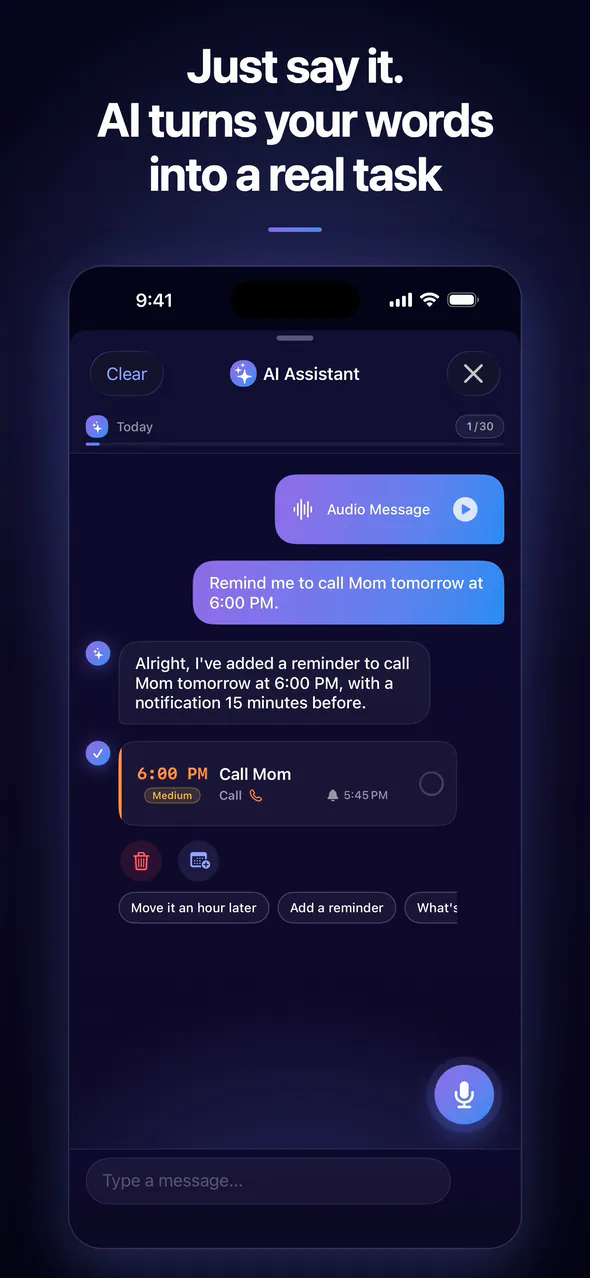
AI assistant
Say it the way you think it.
Speak or type naturally. The assistant picks out the date, time and priority, sets the reminder and files the task — usually before you have put your phone down.
- Voice or textTalk naturally or type a quick note. Both work, in 11 languages.
- Edits on command“Move the dentist to Friday.” “Mark groceries as done.” It changes the tasks you already have.
- Gets the detailsDate, time, priority and reminder — taken from a single sentence.
- Answers out loudA short spoken confirmation, so you can plan with your hands full.
AI assistant
Three seconds from thought to plan
- 01
Tap the microphone
Or type into the assistant — whichever suits the moment.
- 02
Say what needs doing
Dates, times, priorities and reminders in one natural sentence.
- 03
It is on your list
The task appears in your calendar with its reminder, ready to be done.
How does the AI task manager understand me?
TaskFLY sends your voice or text to Google's Gemini model through Firebase, which returns the tasks with their dates, times, priorities and reminders. The app then adds them to your list — no extra confirmation needed.
How many AI commands can I use?
Free users get 5 AI commands a day during their first 7 days. TaskFLY Pro includes up to 30 AI commands a day and longer requests of up to 1,000 characters.
Can the assistant change tasks I already have?
Yes. You can move, complete or delete existing tasks by saying so — for example “move the dentist to Friday” or “mark groceries as done”.
Does the AI assistant work offline?
No. The assistant needs an internet connection. Your tasks, reminders and Pomodoro keep working offline on iPhone, iPad and Mac.
Explore TaskFLY
More ways TaskFLY gives you time back
- Pomodoro timerFocus sessions linked to your tasks, with a Live Activity on the Lock Screen.Learn more
- Shared tasksAssign tasks to friends and family; they get the reminder, you get the update.Learn more
- TeamsTeam task management with time tracking — join the early-access list.Learn more
- PricingFree forever, or Pro for €3.99 a month with a 7-day trial.Learn more
- FAQAnswers about the app, AI, pricing, sharing and privacy.Learn more
- DownloadGet TaskFLY from the App Store or open the web app.Learn more
- BlogPractical guides to planning your day and staying focused.Learn more
Tomorrow can start differently.
Download TaskFLY, say your first task out loud and end the day with everything that mattered done.
Free to start · iPhone, iPad, Mac and web · 11 languages
The Android app arrives in November 2026 — until then, use the web app at app.taskfly.eu.