
Your day takes shape
Over coffee you say three things out loud. TaskFLY dates them, sets the reminders and puts them in order. The plan is ready before you leave the house.
AI to-do list & planner for iPhone, iPad, Mac and the web
TaskFLY turns a single sentence into a planned task, keeps your attention on what matters and shows how far you have come. Fewer loose ends, more finished days — and evenings that belong to you again.

A day with TaskFLY
Productivity is not about doing more. It is about knowing that what matters will get done — and having the head space for everything else.
Over coffee you say three things out loud. TaskFLY dates them, sets the reminders and puts them in order. The plan is ready before you leave the house.
Start a 25-minute focus session on the task that moves you forward. Notifications can wait; the timer stays on your Lock Screen.
Everything that mattered is checked off, the rest has a date. Your streak grows by one — and you close the app without a second thought.
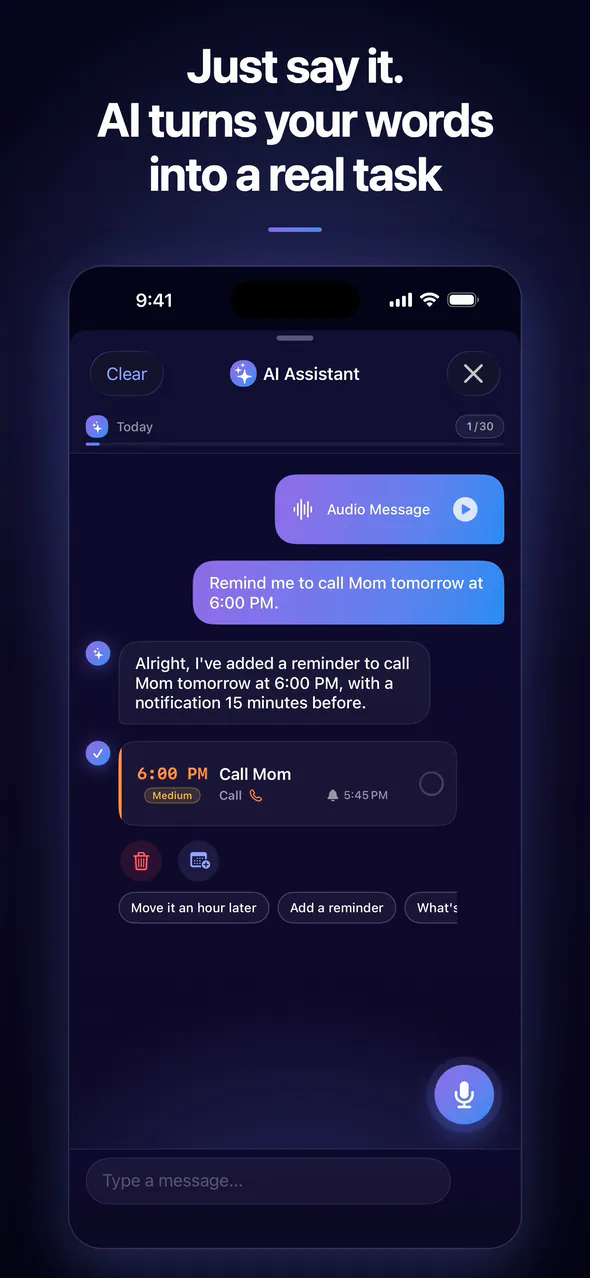
AI assistant
Speak or type naturally. The assistant picks out the date, time and priority, sets the reminder and files the task — usually before you have put your phone down.
Plan
Calendar and list side by side, colour-coded categories, clear priorities and reminders that arrive exactly when they are useful.


The whole month at a glance, or a focused list of what comes next.
Daily, weekly, monthly, yearly or your own rhythm. Set it once and forget it.
Several reminders per task, timed exactly when you need them.
Colour-coded, so what matters stands out at first sight.
Add any task to the calendar on your device with one tap.
Search all your tasks in a second — on Mac with ⌘F.
Focus
Pomodoro is built in. Link the timer to a task, take breaks that actually restore you and watch your focused hours add up.


Progress
Every finished task counts. Your dashboard shows your streak, completed tasks and focus time — and, anonymously, how you compare with other TaskFLY users.
Together
Hand a task to your partner, family or a colleague. It lands on their list with its own reminder, and you know the moment it is done. Made for couples, families and small teams.

Everywhere
One account, always in sync. Widgets on your Home and Lock Screen, a native feel on every Apple device and a web app for any computer.
Today's tasks, progress and streak — without opening the app.
Sign in once and the same tasks are on every screen, including the web app.
No account needed on iPhone. Sign in with Apple or Google whenever you want sync, the web app and friends.
No ads. Your tasks are stored in the EU, and analytics run only with your consent.
The app and the AI assistant speak your language.
Pricing
Everything you need to get organised is free. Pro is for the days when you want no limits at all.
Get organised and stay on track.
€0free forever
For people who want to get there faster.
€3.99per month
Free trial for new subscribers
Everything in Free, plus:
Prices in euros, including VAT. On iPhone, iPad and Mac, Pro is a monthly App Store subscription billed to your Apple ID — the App Store shows your local currency, and you cancel in your Apple ID settings at least 24 hours before renewal. On the web, Pro is €3.99 a month by card at app.taskfly.eu; cancel anytime under “Manage subscription”, effective at the end of the paid period. Pro is currently tied to where you bought it.
TaskFLY for teams
We are building TaskFLY for companies: assign tasks across your team and see who did what and how long it took — as simple as the app you already know.
Write to us and we will let you know as soon as Teams launches.
Yes. Download TaskFLY for free and use it without an account. The free plan includes up to 10 active tasks, the calendar, reminders, Pomodoro, the dashboard, friends and widgets — plus the AI assistant with 5 commands a day for your first 7 days.
Pro unlocks unlimited tasks, up to 30 AI commands a day, longer AI requests (up to 1,000 characters), a default priority, category and reminder for new tasks, and a daily reminder at the time you choose. It costs €3.99 a month — on iPhone, iPad and Mac through the App Store (shown in your local currency), on the web by card at app.taskfly.eu. Pro is currently tied to where you bought it: a web subscription doesn't unlock the iOS app yet, and an App Store subscription doesn't unlock the web app yet.
New subscribers can try Pro free for 7 days. In the App Store, you see whether your Apple ID is eligible before you confirm; on the web, the trial is for accounts that have never subscribed there. You won't be charged if you cancel before the trial ends — in your Apple ID settings, or under “Manage subscription” in the web app.
iPhone and iPad with iOS or iPadOS 17 or later, Macs with Apple silicon, and any computer through the web app at app.taskfly.eu. Sign in with the same account and your tasks stay in sync everywhere.
Not on iPhone, iPad or Mac: you can start right away as a guest, and your tasks stay on your device. Sign in with Apple or Google when you want sync across devices, the web app or to add friends.
TaskFLY and its AI assistant work in 11 languages: English, Slovak, Czech, German, Spanish, French, Hungarian, Italian, Polish, Russian and Ukrainian. Speak or type — the assistant answers in the language you use.
When you sign in, your tasks are stored in the EU; as a guest, they stay on your device. TaskFLY shows no ads, analytics run only with your consent, and you can delete your account and data right in the app. The details are in our privacy policy.
Yes. Add friends by their @nickname and assign them tasks. They get the reminder on their own phone, and you're notified when they start and finish. A dedicated TaskFLY for teams is coming soon.
Yes. On iPhone, iPad and Mac your tasks, reminders and Pomodoro work without a connection and sync when you're back online. The AI assistant needs an internet connection.
Download TaskFLY, say your first task out loud and end the day with everything that mattered done.
Free to start · iPhone, iPad, Mac and web · 11 languages
The Android app arrives in November 2026 — until then, use the web app at app.taskfly.eu.